


MDLIVE: Talk to a Doctor 24/7
4.67.85K Reviews
App Specs
- Version
- 6.9.0.0
- Updated On
- License
- Free
- Downloads
- 1,000,000+
- Developer
- MDLIVE Inc
- Categories
- Medical
- Platform
- Android, iOS
Screenshots

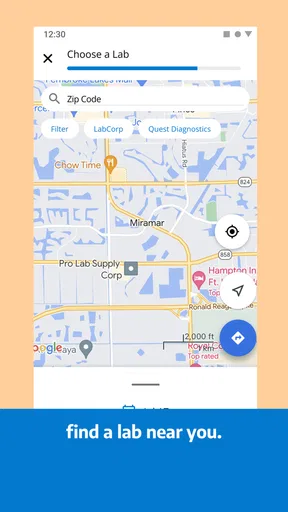

 Analysis by AppCompare
The first few times I reach for a telehealth app, convenience is usually the draw: I want to talk through a concern without arranging a trip or sitting in a waiting room. That’s the appeal of MDLIVE: Talk to a Doctor 24/7. I see it as a way to start a conversation about routine health concerns, not as a replacement for every kind of medical care. Whether it earns a regular place on your phone depends less on novelty and more on whether remote appointments suit the care you actually need.
What I’d want from the first visit
MDLIVE is a medical app from MDLIVE Inc, and its basic purpose is to put a remote doctor visit within reach. It’s free to download, has an Everyone age rating, and has been around since July 11, 2014. Its current version is 6.8.1.0, with support for operating systems starting at version 8.0. Those details make it easy to judge whether it can run on your device, but the more useful question is whether a video or phone conversation fits your situation.
For a first visit, I’d set aside a few minutes to get the account and health information in order before I felt unwell. That small bit of preparation can make a rushed appointment less frustrating: keep a concise note of symptoms, when they began, and any questions you want answered. If you’re helping a family member, have their details and current concerns ready too. A remote clinician has less opportunity to notice things in person, so clear descriptions matter.
When remote care makes sense
A realistic use case is waking up with a mild, familiar concern and wanting professional guidance before deciding what to do next. Rather than trying to diagnose yourself from search results, you can use the app to arrange a consultation and explain what has changed. It may also suit someone whose schedule makes a routine appointment difficult, or a parent who wants to discuss a child’s non-emergency symptoms without bringing the whole household to a clinic.
Still, a screen puts limits on the visit. Some problems need a hands-on exam, tests, or immediate attention, and a telehealth conversation can’t provide those things by itself. If symptoms seem severe or rapidly worsening, I would choose urgent in-person care or emergency help instead of waiting for an app-based appointment. That boundary isn’t a flaw unique to MDLIVE; it’s the central trade-off of remote medicine.
What’s the Deal with MDLIVE?
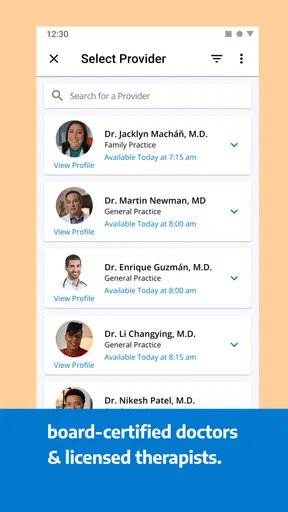
MDLIVE is one of those apps that makes you wonder how you ever got by without it. It’s designed to connect you with board-certified doctors at any hour of the day. Whether it’s a fever, rash, or the dreaded flu symptoms, you can get medical help without leaving your couch. That’s a huge win for anyone who hates long waits in urgent care.
How Does It Work?
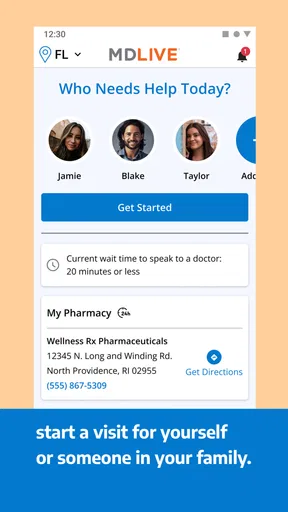
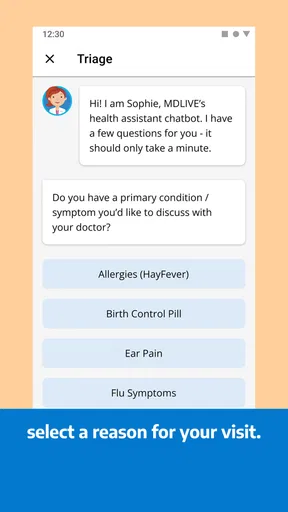
Getting started is a breeze. You download the app, create an account, and fill out some basic health info. It’s like setting up any other app but with the bonus of not having to remember complex medical history every time. Once you’re set up, you can choose a doctor and either start a video call or opt for a phone consultation. You’ll get an estimated wait time, but in my experience, it’s usually under 15 minutes.
Worth Reading Before You Choose

EA SPORTS FC Mobile 26 Is a Bigger Football Game, but It Takes Time

Flipboard Shows What News Apps Must Do Beyond the Feed

Switching to Android Auto Means Rethinking Your Driving Routine

Google Calendar Makes a Crowded Week Easier to Manage

Ludo King Makes the Most of the Minutes Between Plans

Baby Panda World Brings Quick Play to Modern Phones, but Its Game Library Feels Busy
Features You’ll Love
This app isn’t just about video calls. Oh no, it’s got a few more tricks up its sleeve:
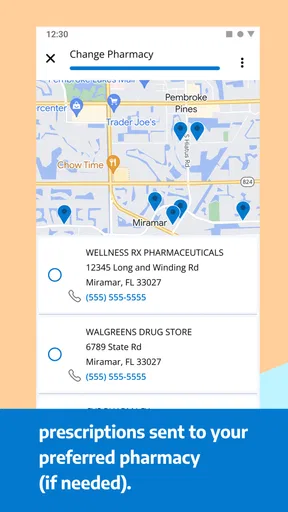
- Prescriptions: If you need medication, MDLIVE can send prescriptions directly to your pharmacy. No need to leave home.
- Behavioral Health: Beyond physical health, you can also book sessions for mental health support. Think therapy sessions without the commute.
- Family Accounts: You can add family members to your account, making it easy to manage everyone’s appointments in one place.
User Experience – Smooth and Simple
Navigating MDLIVE is like a walk in the park. The interface is clean and intuitive. Even if you’re not particularly tech-savvy, you’ll find your way around with ease. I found the appointment booking process straightforward, which is crucial when you’re not feeling well and just want to get things done quickly.
Real Talk – Does It Deliver?
So, does it live up to the hype? In my opinion, absolutely. I’ve used it a couple of times, and each experience was seamless. The doctors were professional and thorough, making sure I understood every part of the diagnosis and treatment plan. Plus, the convenience factor is off the charts. No more waiting rooms full of coughing people!
However, it’s important to mention that it might not replace in-person visits for more severe conditions. For everyday issues and minor concerns, though, it’s a fantastic alternative.
How it compares with a clinic or a health search
Compared with searching symptoms online, a clinician conversation gives you a chance to explain context and ask follow-up questions rather than sorting through possibilities alone. Compared with a regular clinic, the app saves the journey and waiting-room step, but loses the benefit of an in-person examination. I’d use it as a convenient first contact for concerns that seem suitable for remote discussion, then follow the clinician’s advice if an in-person assessment is needed.
It isn’t automatically the best alternative to a usual appointment. If you already have a clinician who knows your history, or your concern requires a physical exam, contacting that clinician or visiting a clinic may be more useful. Telehealth works best when convenience is genuinely valuable and the issue can be discussed clearly by phone or video.
Making the appointment less rushed
One practical habit I’d keep is writing down the main concern before starting a consultation. Put the symptom that worries you most first, then note when it began, what has changed, and what you have already tried. This helps keep the conversation focused, especially if you’re tired or anxious. If there are several unrelated concerns, I’d prioritize rather than trying to cover everything at once.
Also think ahead about the setting. A quiet, private spot and a charged device make a video appointment easier to follow; if video is inconvenient, the phone option gives another way to speak with a doctor. For a visible issue such as a rash, good lighting and a clear description can help the conversation, though a camera still cannot replace an examination.
Does it earn a place after the first week?
The lasting value is less about opening the app often and more about knowing where it fits when a suitable concern comes up. Medical needs are irregular, so I wouldn’t judge it by daily use. I’d judge it by whether the account is ready when you need it, whether remote care is appropriate for your household, and whether the visit helps you decide on a sensible next step.
There is a maintenance trade-off: keeping health details current and remembering how to access the service can save time later, but setting everything up while sick is a poor moment to discover missing information or uncertainty about the process. I’d review the account when well and make sure the device and contact details are usable. That kind of light preparation matters more than repeatedly browsing an app that may only be needed occasionally.
Where the convenience can wear thin
Telehealth can feel less convenient if the connection is unreliable, you dislike discussing personal concerns remotely, or the problem needs an examination. A quick appointment also shouldn’t be mistaken for guaranteed treatment: a clinician may recommend a clinic visit or another form of care, and that can mean an extra step rather than an instant resolution. I’d treat that possibility as part of the plan, not as evidence that the remote conversation was pointless.
Another sensible expectation is to check what applies to your own access before relying on an appointment. Availability, coverage, and any costs for care can depend on circumstances outside the app itself, so I would confirm those details through the relevant service or benefits information rather than assume that a free download means every consultation is free. That is especially worth doing before a late-night visit, when there is less time to sort out account questions.
MDLIVE has an average rating of 4.6 from around 18,000 ratings, and it has passed one million installs. That suggests it has reached many users, but those numbers don’t tell me whether it suits a particular patient. I’d weigh them lightly and focus on the practical fit: remote access for routine concerns, a clear way to explain symptoms, and an understanding of when to seek in-person care instead.
Final Thoughts
In a world where time is of the essence, and convenience is king, MDLIVE: Talk to a Doctor 24/7 is a game-changer. It’s reliable, easy to use, and offers peace of mind knowing that medical help is just a tap away. Whether you’re a busy parent, a frequent traveler, or just someone who values time, this app is worth checking out. Give it a try, and you might just find it’s the healthcare companion you never knew you needed.
My more measured take is that it’s most worthwhile for people who can benefit from remote consultations and who are comfortable preparing a short, clear account of what’s wrong. Someone seeking emergency help, a hands-on assessment, or continuity with a clinician who already knows them should choose the more appropriate route. For everyone else, the app’s value is practical rather than constant: it can be useful to have ready, even if most months pass without needing it.
Pros
- 24/7 access to medical professionals.
- No need for in-person appointments.
- Supports multiple languages.
- User-friendly interface.
- Insurance integration available.
Cons
- Limited specialty options.
- Requires stable internet connection.
- Some features may incur extra fees.
- Not available in all regions.
- Potential wait times during peak hours.
FAQs for MDLIVE: Talk to a Doctor 24/7
What services does MDLIVE offer?
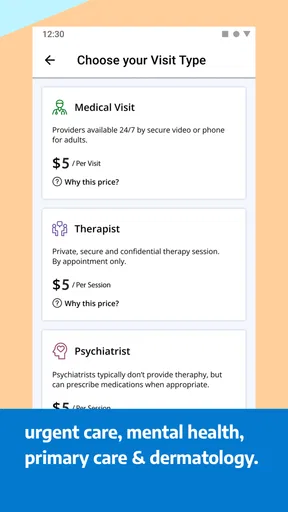
MDLIVE provides a platform for users to connect with board-certified doctors and licensed therapists 24/7. Services include consultations for common medical issues, mental health support, and even dermatology. It's designed to offer quick, convenient access to healthcare without the need for an in-person visit.
How does MDLIVE ensure the privacy and security of my information?
MDLIVE prioritizes user privacy and security by utilizing state-of-the-art encryption and secure protocols. Personal health information is protected under HIPAA regulations, ensuring that all consultations and data exchanges remain confidential and secure from unauthorized access.
Is MDLIVE covered by insurance, and how much does it cost?
Many insurance plans cover MDLIVE services, but coverage can vary. It's advisable to check with your provider to confirm. For those without insurance, the app offers transparent pricing for each consultation type, ensuring users know the cost upfront before proceeding with a session.
Can prescriptions be obtained through MDLIVE?
Yes, doctors on MDLIVE can prescribe medications for many common conditions during a consultation. However, they will not prescribe controlled substances or certain other drugs. Prescriptions can be sent directly to your preferred pharmacy for convenient pickup.
What devices are compatible with the MDLIVE app?
MDLIVE is compatible with a wide range of devices, including smartphones, tablets, and desktops. The app is available for download on both Android and iOS platforms, ensuring that users can access healthcare services on the go or from the comfort of their home.


